“B2B database,” “CRM,” and “contact list” get used as if they mean the same thing and that confusion costs buyers real money when they pay for one tool expecting it to do the job of another. This guide explains exactly how the three differ, how they fit together, and how to tell which one your team actually needs.
The Three Tools, Defined
In one sentence: a
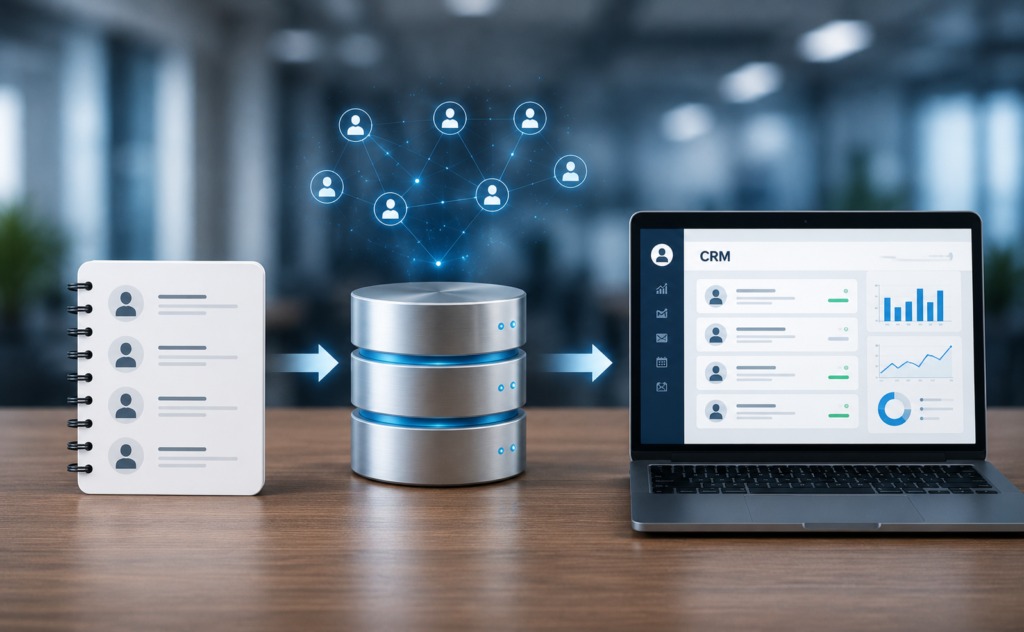
contact list is raw names and details, a
B2B database is the large, maintained source you draw prospects from, and a
CRM is where you manage relationships with the contacts you’re actively working. They solve different problems, and most teams end up using all three.
What a Contact List Is (and Isn’t)
A contact list is a simple, usually static set of records often just a spreadsheet. It has no built-in search, enrichment, or refresh; it’s data sitting in rows. A list is an output, not a system: you might export a list
from a database or import one
into a CRM. On its own, it ages the moment it’s created.
What a B2B Database Does
A B2B database is the large, searchable, continuously maintained source you build lists from. Think of it as the well; the list is the bucket of water you draw. Its job is breadth, accuracy, and filtering letting you find the right prospects by industry, size, seniority, or technology, and pull fresh contact details on demand.
What a CRM Does
A CRM tracks your interactions with specific contacts and accounts emails sent, calls made, deal stage, notes, and next steps. Salesforce, HubSpot, and Pipedrive are common examples. A CRM manages relationships you already have; it doesn’t generate new prospects on its own, and the data inside it gradually goes stale unless you refresh it.
How the Three Work Together
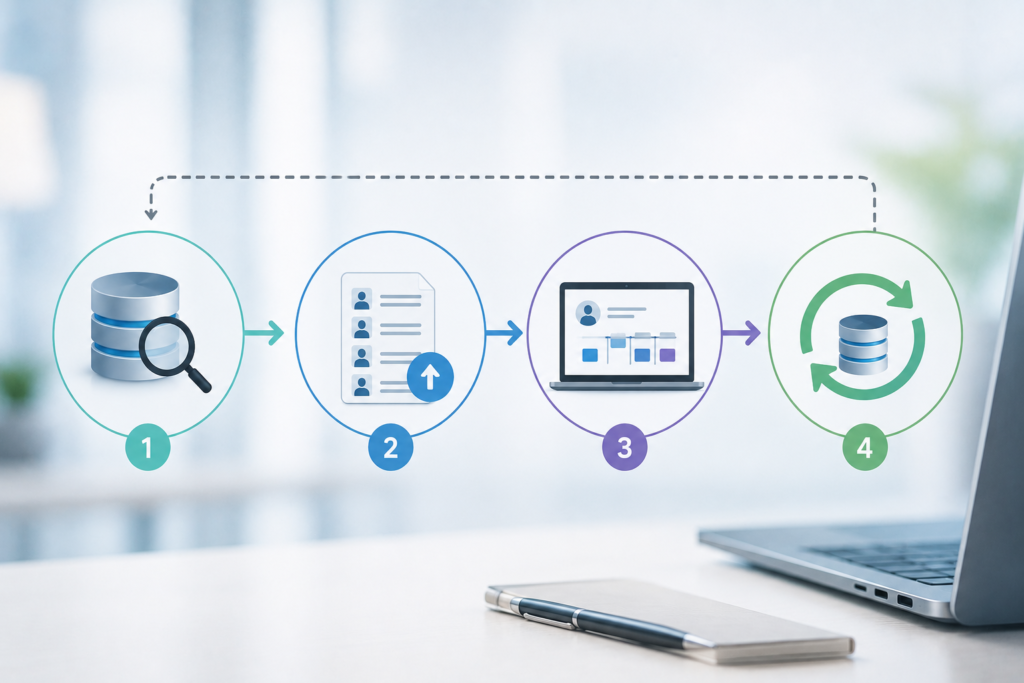
The typical workflow runs in sequence:
- Search the database to build a targeted list of prospects that fit your ideal customer profile.
- Pull that list and import the qualified records into your CRM.
- Work those relationships through your pipeline, logging activity as you go.
- Periodically return to the database to enrich or refresh the records already in the CRM.
Used this way, the database keeps the top of your funnel full while the CRM manages everything downstream.
Where Data Enrichment Fits In
Enrichment is the bridge between database and CRM. It means filling in or updating missing fields on contacts already in your CRM adding direct dials, correcting job titles, or refreshing company data using the database as the source of truth. Many database providers offer enrichment as a built-in feature, which is often a reason to buy even when you aren’t adding brand-new prospects.
Choosing What You Actually Need
Most teams already have a CRM, so the real decision is usually whether to add a B2B database to feed it. Buying a standalone contact list is rarely the right long-term move because it ages immediately and isn’t searchable. If your CRM is running dry or filling up with stale records, that’s the signal a database will solve a problem the CRM can’t.
Key Takeaways
The database is
where you find prospects, the list is
what you pull out, and the CRM is
where you work the ones that matter. A CRM can’t replace a database (it has no fresh external universe of prospects), and a database can’t replace a CRM (it doesn’t manage pipeline). Matching the tool to the job is how you avoid paying for capabilities you don’t need.
Frequently Asked Questions
Can a CRM replace a B2B database?
No. A CRM only contains contacts you’ve already added, and that data decays over time. When you need fresh, qualified prospects, you go to a B2B database and feed the good ones into the CRM.
Can a B2B database replace a CRM?
No. A database is built for finding and filtering prospects, not for tracking deal stages, logging activities, or managing a pipeline. Running your sales process out of a static list is how leads slip through the cracks.
Do I need to buy all three?
Not usually. Most teams already use a CRM, so the question is whether to add a database to supply fresh prospects. A standalone contact list is rarely worth buying because it isn’t searchable and ages instantly.
What is data enrichment?
Enrichment fills in or updates missing fields on the contacts already in your CRM such as direct dials or corrected titles using a B2B database as the reference source.
Which one finds me new prospects?
The database. A CRM only holds people you’ve already added, so when it runs dry you return to the database to source new, qualified contacts.
How does a B2B database improve CRM data quality?
A B2B database helps keep CRM records accurate by updating outdated contact information, correcting job titles, filling in missing fields, and identifying new decision-makers. This reduces the impact of data decay and improves sales and marketing performance.
When should a company invest in a B2B database?
If your team is struggling to generate enough qualified leads, spending too much time on manual prospecting, or working with outdated CRM data, it’s usually time to add a B2B database. It provides a scalable source of fresh prospects and updated contact information.
Can I build my own B2B database instead of buying one?
You can, but maintaining accurate business and contact data requires constant research and verification. For most companies, purchasing access to a professional B2B database is faster, more cost-effective, and far easier to keep current.
How often should I enrich my CRM data?
Most organizations enrich their CRM data at least quarterly, while others use automated enrichment tools to update records continuously. The more frequently your target market changes, the more often your data should be refreshed.
How do I measure the ROI of a B2B database?
Measure ROI by tracking qualified leads generated, meetings booked, opportunities created, pipeline value, and revenue influenced by database-sourced contacts. A good B2B database should generate significantly more value than it costs.