Web accessibility making websites usable by people with disabilities has moved from a nice-to-have to a near-requirement, driven by both ethics and legal exposure. WCAG 2.1 AA is the standard most commonly referenced. This article explains what WCAG 2.1 AA requires, why it matters legally and practically, and how to approach accessibility. It is general information, not legal advice.
What WCAG 2.1 AA is
WCAG (Web Content Accessibility Guidelines) is the internationally recognized standard for web accessibility, published by the W3C. It defines how to make web content accessible to people with a wide range of disabilities — visual, auditory, motor, cognitive, and others. WCAG 2.1 is a version of the guidelines, and AA is a conformance level (the middle level, between A and AAA) that’s the most commonly targeted and referenced standard for compliance.
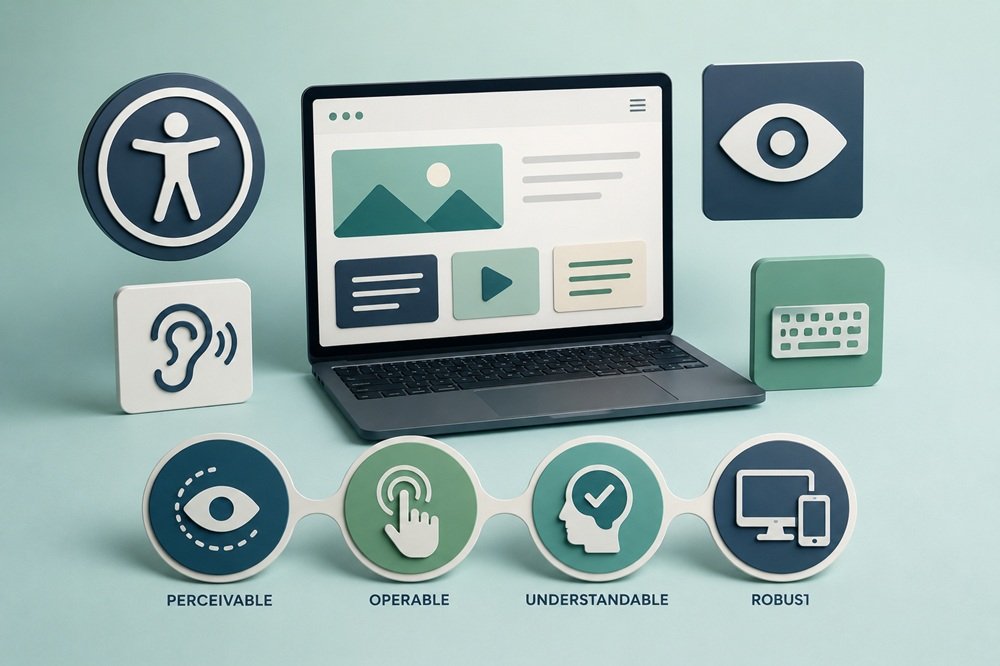
WCAG organizes its requirements around four principles, often summarized as
POUR: content must be
Perceivable (users can perceive it — e.g., text alternatives for images, captions for audio),
Operable (users can operate it — e.g., keyboard accessibility, enough time to interact),
Understandable (users can understand it — e.g., readable text, predictable behavior), and
Robust (content works across assistive technologies and devices).
Under these principles, AA conformance involves specific success criteria — things like sufficient color contrast, text alternatives for non-text content, keyboard accessibility, captions for video, clear navigation, properly labeled forms, and content that works with screen readers and other assistive technologies.
WCAG 2.1 AA matters for two reasons: it’s the right thing to do (making your site usable by everyone, including the substantial population with disabilities), and it’s increasingly tied to legal exposure, as accessibility-related legal claims have grown and standards like WCAG 2.1 AA are commonly referenced as the benchmark. This is general information; consult an attorney about your specific legal obligations.
Common questions
What is WCAG 2.1 AA accessibility?
WCAG 2.1 AA is a recognized technical standard for making websites and digital content accessible to people with disabilities. It builds on WCAG 2.0 and adds requirements addressing areas including mobile accessibility, low vision, and cognitive and learning disabilities. WCAG organizes accessibility around four principles: perceivable, operable, understandable, and robust.
What does WCAG 2.1 AA actually require?
Level AA requires a website to satisfy all applicable Level A and Level AA success criteria. Requirements cover areas such as keyboard accessibility, text alternatives, color contrast, navigation, forms, error handling, responsive reflow, text spacing, non-text contrast, and status messages. WCAG success criteria are testable requirements rather than general design suggestions.
What is the difference between WCAG 2.1 A, AA, and AAA?
The levels represent increasing degrees of conformance. Level A addresses the minimum requirements, Level AA includes all Level A and AA criteria, and Level AAA includes all three levels. WCAG 2.1 AA is commonly used as the practical target because it addresses a broader range of accessibility barriers without requiring every AAA criterion.
Does WCAG 2.1 AA automatically make a website legally compliant?
No. WCAG is a technical accessibility standard; whether a website satisfies a legal obligation depends on the applicable law, organization, jurisdiction, and circumstances. Some laws and regulations specifically reference WCAG, while others establish broader accessibility or nondiscrimination requirements. Meeting WCAG can therefore be an important part of an accessibility compliance program without being a universal legal safe harbor.
Is WCAG 2.1 AA legally required in the United States?
It depends on the organization. For state and local governments covered by ADA Title II, the DOJ’s web-accessibility rule specifically requires WCAG 2.1 Level AA for covered web content and mobile apps. In April 2026, the DOJ extended the compliance deadline to April 26, 2027 for covered public entities serving populations of 50,000 or more, and to April 26, 2028 for smaller public entities and special district governments.
For private businesses, ADA obligations can also apply to website accessibility, but businesses should not assume there is a single federal rule requiring every private website to meet WCAG 2.1 AA in exactly the same way. The legal analysis depends on the circumstances.
What are the most common WCAG 2.1 AA issues on business websites?
Common problems include inadequate color contrast, missing or ineffective alt text, inaccessible forms, poor keyboard navigation, missing focus indicators, unclear link text, incorrect heading structures, inaccessible menus, content that does not reflow properly on smaller screens, and status or error messages that assistive technologies cannot detect. Automated tools can find many of these problems, but not all WCAG criteria can be reliably evaluated automatically.
Can an accessibility plugin make a website WCAG 2.1 AA compliant?
Not by itself. Plugins and automated tools can help identify or address certain accessibility problems, but WCAG conformance is determined by whether the applicable success criteria are actually satisfied. Human testing is important because some criteria require manual evaluation, and accessibility depends on how people using assistive technologies can actually interact with the website.
How should a business test for WCAG 2.1 AA compliance?
Use a combination of automated scanning and manual testing. Test keyboard-only navigation, focus behavior, forms, menus, headings, links, zoom and reflow, contrast, multimedia, error handling, and important user journeys. Where appropriate, test with screen readers and involve people with disabilities in usability testing. W3C specifically notes that some WCAG success criteria require human testing and recommends usability testing with people who have disabilities.
Does WCAG 2.1 AA improve SEO and conversions?
Accessibility is not an SEO ranking guarantee, but many accessibility practices also improve the usability and technical quality of a website. Clear headings, descriptive links, semantic structure, usable forms, readable content, and good mobile behavior can benefit both accessibility and general user experience. The primary reason to implement accessibility, however, is to ensure people with disabilities can access and use the site’s content and functionality.
Should businesses target WCAG 2.1 AA or WCAG 2.2 AA?
That depends on the legal, contractual, and organizational requirement. WCAG 2.2 adds additional success criteria while remaining backward compatible with WCAG 2.1. W3C recommends using the latest version, but WCAG 2.1 remains a current standard and is specifically incorporated into certain legal requirements, including the DOJ’s 2024 Title II web-accessibility rule.
What is the biggest mistake businesses make with WCAG compliance?
Treating accessibility as a one-time automated scan or installing an accessibility widget and assuming the problem is solved. Accessibility needs to be incorporated into design, development, content, testing, and ongoing maintenance. A website can pass an automated scan while still creating significant barriers for users. WCAG conformance is based on the applicable success criteria, not on whether a particular accessibility tool or technique was used.
How this applies to your business
Treat WCAG 2.1 AA as both an ethical standard and a legal risk-reduction measure. Meeting it makes your site usable by the substantial population with disabilities — the right thing to do and a reach benefit — while also addressing the growing legal exposure around web accessibility, since WCAG 2.1 AA is the commonly-referenced benchmark. Approaching accessibility as good practice that also reduces legal risk captures its full value. Consult an attorney about your specific legal obligations, as the legal landscape is complex; this article is general guidance.
Audit your site against WCAG 2.1 AA to know where you stand, combining automated and manual testing. Many sites fail common, addressable accessibility criteria — insufficient contrast, missing alt text, lack of keyboard accessibility, poorly-labeled forms — without their owners realizing, because these issues aren’t visible to users without disabilities. A thorough audit combining automated tools (for issues like contrast) and manual testing (keyboard, screen reader, human review) identifies your gaps and what needs remediation. Don’t assume accessibility without testing; audit to find the real state of your site.
Build accessibility in for new development and remediate existing sites through audit and fixes. Building accessibility in from the start — proper structure, contrast, keyboard support, labeling — is far more efficient than retrofitting and produces a naturally accessible site. For existing sites, retrofitting through an audit and remediation is necessary and worthwhile. Either way, accessibility benefits your users, expands your reach, can help SEO, and reduces legal exposure simultaneously — making it a high-value investment whether built in or retrofitted.
Iscope Digital’s
Creative & Web Development service builds sites to WCAG 2.1 AA standards and audits/remediates existing sites for accessibility. For the broader quality standards good development meets, see
Core Web Vitals in 2026, and for the structured data that complements accessible markup,
JSON-LD schema for B2B websites.